
healthcare virtual assistant service automotive virtual assistant services Logistics Services media entertainment services education virtual assistant services
education virtual assistant services healthcare virtual assistant service media entertainment services real estate outsourcing services

Best Software for Virtual Assistants

best software for virtual assistants free tools and skills list

Best Software for Virtual Assistant Services

If there’s one thing every virtual assistant learns early, it’s this: your success depends just as much on your tools as on your virtual assistant skills. The moment you start managing clients, deadlines, inboxes, calendars, and those “urgent but not really urgent” messages, you quickly realize the value of using the best software for virtual assistants.

That’s why having a reliable virtual assistant tools list—including both premium and free tools for virtual assistants—is essential. The right software for virtual assistants doesn’t just keep you organized. It boosts your productivity, enhances your workflow, and helps you show up like a superhero for your clients. And yes, there’s plenty of free software for virtual assistants that delivers powerful results without costing a dime.

Let’s dive into the platforms, free tools, and skill-boosting apps that top VAs swear by… without the fluff or generic recommendations you can find anywhere.

Why Software Matters More Than Ever for Virtual Assistants

You could be the most talented virtual assistant on the planet—organized, quick, resourceful, detail-obsessed—but if you're using outdated tools or juggling tasks manually, your workflow turns into a chaotic maze. And chaos doesn't scale. Clients don’t hire VAs to struggle; they hire VAs to bring structure and clarity to their lives or businesses.

The truth is, the best software for virtual assistants becomes your silent partner—the behind-the-scenes engine that keeps your day running smoothly. From free task management apps to powerful CRM tools, the right tech stack saves hours each week and unlocks the kind of efficiency clients will happily pay a premium for.

Categories of the Best Software for Virtual Assistants

To avoid overwhelming you, I’ve broken the tools into categories that match the daily responsibilities of a VA. Everything here is either widely used in the industry, trending, or highly recommended by seasoned virtual assistants.

And yes—I’ve included a mix of free tools, premium tools, and skill-boosters.

free software for virtual assistants

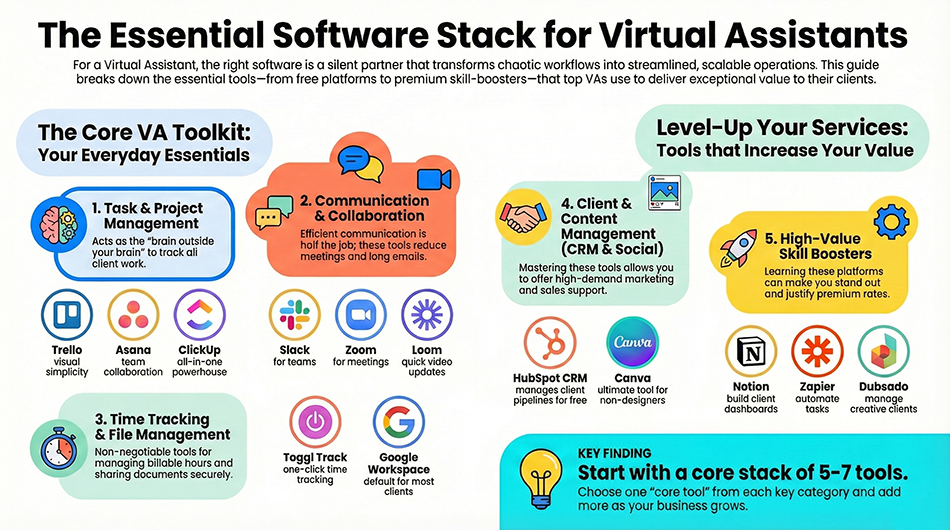
1. Task & Project Management Tools (Essential for Every VA)

If you’ve ever woken up trying to remember which client needed what… welcome to the club. A solid task management tool acts like the brain outside your brain.

1. Trello (Free + Paid)

A visual, card-based system perfect for VAs who love simplicity.
Why VAs love it:

  • Easy drag-and-drop board organization
  • Great for tracking recurring tasks
  • Works beautifully for social media, admin, and content workflows

This is one of the most beginner-friendly free tools for VAs.

2. Asana (Free + Paid)

More robust than Trello, but still friendly to new VAs.
Perfect for client teams that need collaboration.

Best features:

  • Subtasks + dependencies
  • Timelines
  • Automated follow-ups
  • Cleaner assignment workflows

A go-to for VAs working with agencies, ops teams, or startups.

3. ClickUp (Free + Paid)

ClickUp is like the Swiss Army knife of productivity platforms.

Why it lands on nearly every best software for virtual assistants list:

  • You can manage clients, content, docs, CRM, SOPs, and even time tracking all in one place
  • Extremely customizable
  • Works for solo VAs and teams

Many pro VAs build ClickUp spaces as a premium skill—clients will pay more for this expertise.

2. Communication & Collaboration Tools

Let’s be honest: half the VA job is communicating efficiently without drowning in messages.

4. Slack (Free + Paid)

A must if you work with startups or teams.
Features include channels, DMs, file sharing, and automated workflows.

5. Zoom (Free + Paid)

Still the king of virtual communication.
Perfect for client onboarding, weekly check-ins, or workshop hosting.

6. Loom (Free + Paid)

Every VA should use Loom—it’s a quick video messaging tool.
Record your screen, talk through updates, and avoid long emails.

Why clients love it:

  • Clear instructions
  • Transparent workflows
  • Fast communication
  • Reduces meetings

An absolute skill-building tool for any modern VA.

3. Time Tracking & Productivity Tools

When you’re juggling multiple clients, tracking hours is non-negotiable.

7. Toggl Track (Free + Paid)

The simplest time tracker out there.

Why it’s one of the best software for virtual assistants:

  • Clean interface
  • One-click time tracking
  • Detailed reports

Clients appreciate seeing exactly where time goes.

8. Clockify (Free)

A powerful free alternative to Toggl.
Includes timesheets, projects, and dashboards.

Perfect for newer VAs who want seamless, no-cost time tracking.

4. File Sharing & Documentation Tools

You’ll use these daily—trust me.

9. Google Workspace (Free + Paid)

Docs, Sheets, Slides, Drive—everything in one place.
This is the default choice for most clients.

10. Dropbox (Free + Paid)

Great for sharing large files or working with media-heavy clients.

11. Notion (Free + Paid)

Notion is both a tool and a skillset.

VAs use Notion for:

  • Client dashboards
  • Wikis
  • SOP storage
  • Content calendars
  • CRM systems

If you master Notion, your value instantly increases.

5. CRM Tools for Client & Customer Management

If your client works with customers, leads, or sales pipelines, you need CRM literacy.

12. HubSpot CRM (Free)

One of the most powerful free CRMs available.

Why VAs should know it:

  • Manage leads
  • Track deals
  • Automate email tasks
  • Perfect for business owners

Clients get excited when a VA already knows HubSpot.

13. Dubsado (Paid)

Popular with coaches, consultants, creatives.

Handles:

  • Contracts
  • Invoices
  • Automation
  • Client portals

Many VAs specialize in Dubsado setup as a premium skill.

6. Social Media & Content Tools

For VAs offering marketing support, these tools are gold.

14. Canva (Free + Paid)

The ultimate graphic design tool for non-designers.

VAs use Canva to create:

  • Social graphics
  • Presentation decks
  • Client proposals
  • Ebooks
  • Reels & TikTok content

Advanced Canva skills can become a standalone service.

15. Buffer / Meta Business Suite (Free + Paid)

Scheduling tools for social media management.

Buffer = simple + clean
Meta Suite = powerful + free

Almost every VA uses at least one of these.

Bonus: Skill-Boosting Tools Every VA Should Learn

This isn’t required, but knowing these tools makes you stand out:

  • Zapier (automation)
  • Grammarly (writing quality)
  • Calendly (scheduling)
  • ChatGPT (research/writing aid)
  • Mailchimp / ConvertKit (email marketing)
  • QuickBooks (for bookkeeping VAs)

The more tools you master, the more you can charge—simple as that.

How to Build Your VA Software Stack (Without Overwhelm)

Not every VA needs every tool.
Here’s a simple 3-step approach:

Step 1: Identify Your VA Skills

Admin VAs need task tools.
Marketing VAs need content tools.
Executive VAs need communication tools.
Specialized VAs (real estate, ecom, bookkeeping) need niche tools.

Step 2: Choose 1 “Core Tool” from Each Category

Example for a general VA:

  • ClickUp
  • Google Workspace
  • Slack
  • Canva
  • Toggl

That alone covers 80% of your work.

Step 3: Add Tools as Your Client Base Grows

More clients → more complexity → more tools.
Grow slowly and intentionally.

Frequently asked questions (FAQ)

Trello, Google Workspace, Slack, Canva, Clockify, and Loom are the best beginner-friendly tools—many of them completely free.

Some must-have free tools include Trello, Google Drive, Canva, Clockify, Meta Business Suite, HubSpot CRM, and Loom.

Skills in ClickUp, Notion, Dubsado, CRM management, automation (Zapier), and Canva dramatically increase your earning potential.

Yes—task tracking is crucial. Clients expect VAs to be organized; tools like ClickUp or Asana keep everything on track.

Executive VAs often rely on Notion, HubSpot, Zoom, AI writing assistants, advanced scheduling tools, and cross-platform communication systems.

Absolutely. Many VAs start entirely with free tools until their income grows—and then upgrade as needed.

A solid starting stack includes 5–7 core tools. You can expand as your services or client base grows.