

The Rise of the Outsourced Executive Assistant for Document Management
The Rise of the Outsourced Executive Assistant for Document Management
It’s no secret that remote work changed everything. CEOs, founders, and even small business teams now deal with overflowing digital clutter — Google Drive folders no one remembers creating, contracts lost in email threads, and documents shared with permission settings that apparently decided to deny access “just because.”
Somewhere along the way, “document management” turned into a full-time job.
A mentally exhausting, detail-heavy, why-is-this-so-hard kind of responsibility.
That’s exactly why hiring an outsourced executive assistant for document management has become one of the fastest-growing operational strategies across industries. It’s not just cost-effective — it’s sanity-saving.
But let’s unpack it properly, because the benefits go way deeper than “someone who organizes your files.”
What an Outsourced Executive Assistant Actually Does (Beyond Just Organizing Files)
When people first hear the role title, they imagine a virtual administrator who spends the day renaming folders. Cute idea, but wildly inaccurate.
A skilled outsourced EA handles document management as a critical business function, not a housekeeping chore.
Core Responsibilities They Take Off Your Plate
Here’s what they actually do — the real job description executives rarely talk openly about:
- Create and maintain your entire document architecture
Not just “tidy your Drive,” but:
- Standardize naming conventions
- Build intuitive folder hierarchies
- Implement version control
- Tag, archive, and classify every document
It’s like building the skeleton of your digital HQ.
- Manage contracts, proposals, and confidential files
Think:
- NDAs
- Agreements
- Customer contracts
- Legal documents
- Compliance forms
They keep everything secure, findable, and properly tracked.
- Streamline your daily workflow
Your outsourced executive assistant manages:
- Real-time access requests
- Document approvals
- File routing
- Internal collaboration
- And attachment logistics
This translates to fewer Slack messages like:
“Hey, does anyone know where the Q3 deck is?”
- Own your document lifecycle
From creation → editing → approvals → archiving → deletion.
A true EA manages the full journey, not just storage.
- Serve as your second brain
They anticipate:
- What you’ll need
- When you’ll need it
- Who else should receive it
- And which version is the correct version
Ever had the wrong file pulled up during a meeting?
Yeah. They prevent that forever.
Why Outsourcing Is More Effective Than Hiring In-House
Here’s where things get interesting.
Most companies assume bringing someone in-house is “safer.”
But in this specific niche — document management — outsourcing is almost always the smarter move.
Cost Efficiency Without Sacrificing Expertise
An in-house assistant costs:
- Salary
- Benefits
- Payroll taxes
- Equipment
- Training
- Overhead
An outsourced executive assistant for document management costs a fraction of that — often 60–70% less.
And they usually come pre-trained in systems your team barely knows how to spell.
Higher Specialization
Outsourced EAs typically support multiple clients over years, which means:
- They’ve seen dozens of document ecosystems
- They know best practices across industries
- They spot inefficiencies you don’t even recognize
- They fix problems before they become headaches
This is the kind of expertise you can't “train into” a general assistant.
Scalability
Busy season? They scale up.
Quiet season? They scale down.
You don’t need to stretch someone too thin or justify a full-time desk.
How an Outsourced Executive Assistant Transforms Your Operations
This is the part executives consistently underestimate.
Document management isn’t about organizing something once — it’s about transforming how your entire company operates.
Here’s what changes the moment an EA takes over:
1. Faster Decision-Making
When everything is findable in seconds, decision velocity skyrockets.
You’re no longer:
- Clicking through endless folders
- Searching inboxes
- Asking team members
- Digging through notes
- Wasting cognitive bandwidth
You focus on actual decisions — not file hunting.
2. Reduced Errors
Document chaos leads to:
- Wrong versions being used
- Expired contracts being signed
- Missing attachments
- Compliance issues
- Internal miscommunication
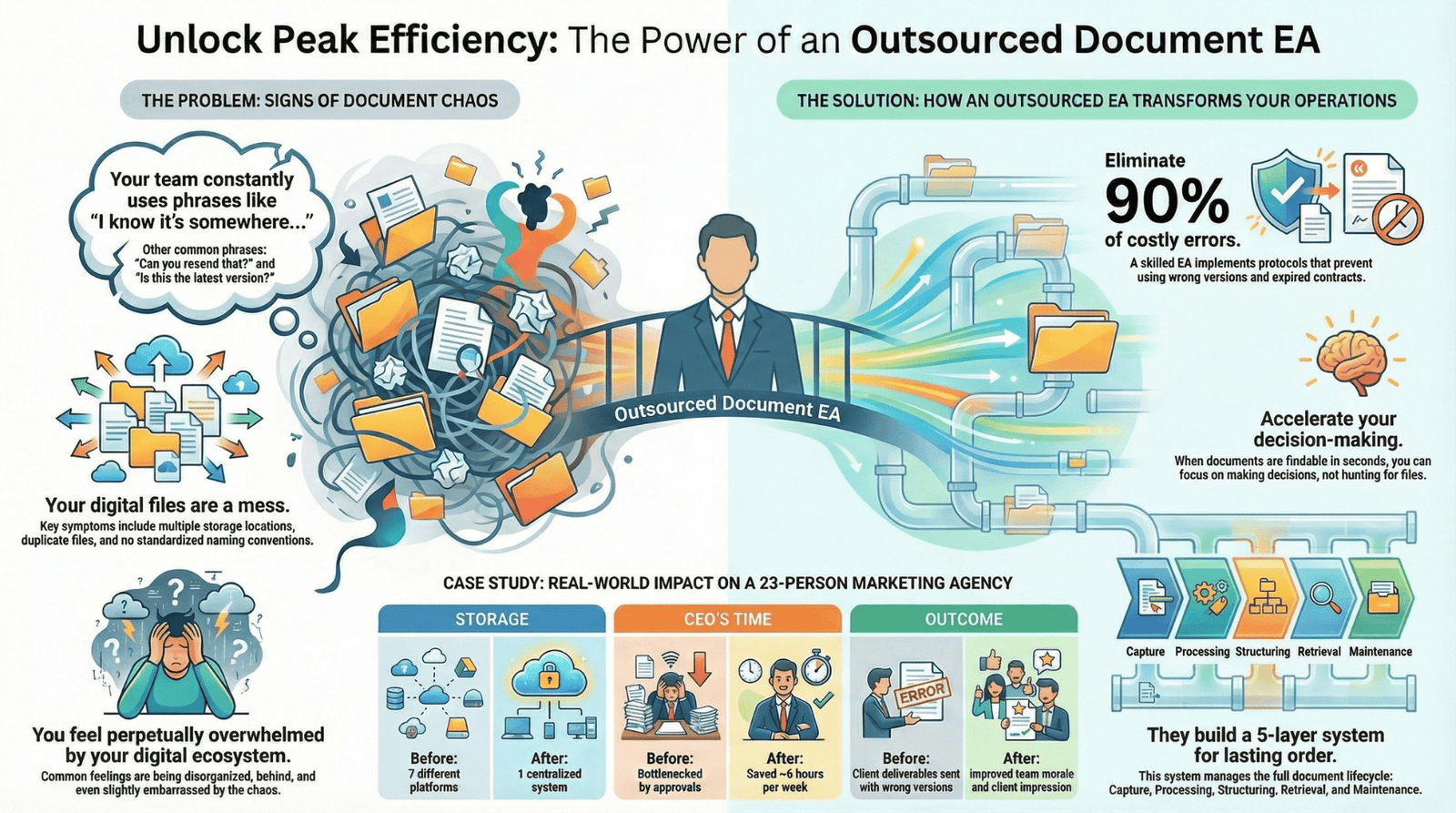
An EA eliminates 90% of this risk with well-built protocols and oversight.
3. Happier Teams
People underestimate morale impact.
When a team can’t find things, frustration builds.
When files make sense and workflows are clean, everyone is calmer, faster, and more effective.
4. Better Client Impression
Clients love:
- Seamless document access
- Quick turnaround
- Clean, organized resources
- Accurate file delivery
Your outsourced executive assistant becomes part of your brand identity — one that screams professionalism.
Signs You’re Ready to Hire an Outsourced Executive Assistant for Document Management
Here’s how you know the time has come:
You’re using phrases like:
- “I know it’s somewhere…”
- “I’ll find it tonight.”
- “Can you resend that?”
- “Is this the latest version?”
Your team has:
- Multiple places where files are stored
- Random folder structures
- Duplicates everywhere
- No version control
- No standardized naming conventions
You feel:
- Behind
- Disorganized
- Slightly embarrassed
- Overwhelmed by your digital ecosystem
If that sounds familiar, congratulations — this is your signal.
A Simple Framework: The 5-Layer Document Management System Your Outsourced EA Will Build
This is a framework I teach executives who want to understand how these assistants create order from chaos.
Your EA will usually build something like this:
Layer 1 — Capture
All documents flow into:
- Standardized inbox folders
- Automations
- Templates
- Submission points
Layer 2 — Processing
Your EA decides:
- Where it goes
- What it’s labeled
- Who needs visibility
- Whether it requires approval
Layer 3 — Structuring
This is where the architecture lives:
- Folders
- Tags
- Categories
- Naming conventions
Layer 4 — Retrieval
Searchability becomes effortless with:
- Metadata
- Cross-linking
- Shared indexes
- Shortcuts
Layer 5 — Maintenance
Your EA keeps everything clean through:
- Weekly audits
- Archiving
- Deleting
- Updating permissions
It’s a living system — one that grows the way your business grows.
Real-World Example: Before & After Hiring an Outsourced EA
Company: A marketing agency with 23 employees
Problem: They were losing nearly 10 hours a week searching for documents.
Before:
- 7 different storage platforms
- Files duplicated across tools
- No naming convention
- Client deliverables sometimes sent with wrong versions
- CEO bottlenecked by approvals
After hiring an outsourced executive assistant:
- Everything centralized into one cloud system
- 3-step naming convention adopted company-wide
- Permissions standardized
- Version control installed
- CEO saved ~6 hours per week
- Team morale improved
- Clients noticed the difference
This isn’t an exaggeration — it’s normal.
What to Look For in a Great Outsourced Executive Assistant for Document Management
You’re not hiring someone to alphabetise folders.
You’re hiring someone to build the spine of your business.
Look for:
✔ Experience with frameworks (Lean, GTD, PARA, OKRs)
✔ Expertise in common platforms (Google Workspace, Notion, Dropbox, SharePoint)
✔ Comfort with SOPs and workflows
✔ A near-obsessive attention to detail
✔ Proactive communication
✔ Ability to anticipate needs
✔ Security awareness
✔ Proof they’ve built document architectures before
This role requires both left-brain precision and right-brain problem-solving.
Actionable Steps to Get Started with Your Own EA
Here’s your mini playbook:
- Map your current “document ecosystem”
Write down every place files live.
You’ll be shocked.
- Identify the biggest pain points
Ask your team what slows them down.
- Choose your ideal assistant profile
Do you want:
- Someone technical?
- Someone administrative?
- Someone who understands legal docs?
- Someone familiar with your industry?
- Start with a 30-day pilot
Let them:
- Audit
- Rebuild
- Organize
- Streamline
By day 30, you’ll feel the weight off your shoulders.
- Establish a long-term maintenance plan
Document management is ongoing — not a one-and-done cleanup.
Frequently asked questions (FAQ)
1. What does an outsourced executive assistant for document management actually do day-to-day?
They handle organizing, structuring, auditing, updating, and maintaining your digital document ecosystem — including naming conventions, folder architecture, access control, file routing, and version management.
2. How much does a document-focused outsourced EA cost?
Rates vary by experience and location, but most range from $25/hour to $60/hour, or $1,000–$3,500/month for dedicated ongoing support.
3. Is outsourcing secure for confidential documents?
Yes — provided you hire an assistant with security training, NDAs, and experience handling sensitive information. Most are well-versed in privacy protocols.
4. Can an outsourced EA work with tools like Notion, Google Drive, and SharePoint?
Absolutely. Most specialize in modern platforms and can even optimize your setup using automations and integrations.
5. How fast does an EA clean up document chaos?
A moderate-sized business typically sees major improvements within 30 days, with full system optimisation completed in 60–90 days.
6. Does my business need a full-time assistant or part-time?
Most teams don’t need full-time help. Part-time outsourced support is usually enough to build and maintain excellent systems.
7. What’s the biggest benefit of outsourcing document management?
Speed, expertise, and freedom. You reclaim hours and eliminate operational friction almost instantly.
Categories
Populer Posts
The Hidden Weight of Payroll
By Souvik January 14, 2026
Best Software for Virtual Assistants
By Souvik January 14, 2026
Bookkeeping Virtual Assistant
By Souvik January 13, 2026